Marbluino: Introduction
Here’s a first article in a series about a hobby project of mine - a simple Arduino based game.
Idea
I always liked tinkering with software and hardware, and some 10-ish years ago, I bought myself an Arduino (the original, Italian version!), and played with it a bit. From then on, every year or two I get the urge to get my hands and soldering iron busy a bit, I buy couple of gadgets, create something small-ish, and leave it back in the drawer for another month or a year.
So, couple of years ago, I got myself one of those Chinese “Arduino sensor kits”, with bunch of different modules, some LEDs, some resistors, electromotors and so on. Among other things, it contained a small acceleration sensor, which can basically tell you how it is oriented, in relation to Earth centre of mass. It can also detect movement, taps etc.
I got the idea to create a small game that would use orientation as a input method. Actually, I wondered if it would be possible to create a hardware game which wouldn’t need any other input method. So, no buttons, switches or touchpads - only orientation sensor.
As an output, I chose what I already had, basically the cheapest possible display: PCD8544 based popular “Nokia 5110” display. So, with 84x48 pixels, first that comes to mind is some kind of “snake”. So, snake which is steered by tilting the game? Snake has only four discrete possibile states as an input, so not very attractive for such a rich continuous space that acceleration sensor offers. So… a marble!
Some decades ago, there was a game called Oxyd, and later its open-source clone called Enigma. I recommend everyone to try them out if they can. The idea is, you steer a marble using a mouse, and you have to solve different puzzles. The marble offered interesting “spin” to the mouse input: it does not simply go where your mouse cursor moves, but introduces inertia! No, really, you just have to try it, you’ll get the idea instantly.
So, let’s create a simplified, 80x40px version of Oxyd!
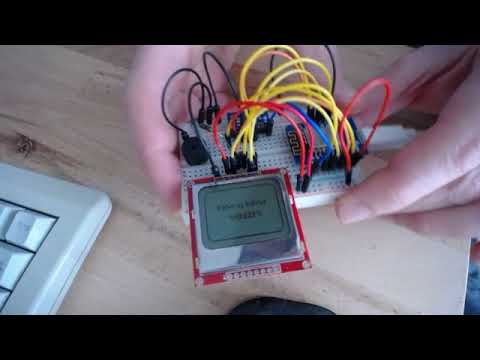
Equipment
Microcontroller
Again, I used what I already had: first iteration I made using Arduino Pro Mini. I had both 5V and 3.3V variants, but 3.3V variant is much better, as both MMA sensor and the display work on 3.3V. With 5V MCU, I’d have to reduce the voltage before feeding the peripherals, which probably means a bunch of additional resistors all over the place.
The problem with the Pro Mini I had is that they were the ones with Atmega168 processor. When I was buying them, I didn’t really know the difference, but they have only 16kB of ROM. Using multiple peripherals means using multiple libraries, and all of them bring some kBs. 16kB is rather tight, even would have been in the old old days (my first computer in the eighties had 48kB!).
So, I quickly hit the ceiling while working on the game, and I didn’t feel the need to cut features at that point - memory is super cheap nowadays. The variant with 32kb is perhaps couple cents more expensive. Not to mention other boards - ESP8266 comes with 4Mb as a standard, plus Wifi, all that for less than 5€!
I immediately ordered couple of 32kb Minis, but in the meantime, I ported existing code to ESP8266 (namely, Wemos D1 mini, which I also had). It is also a 3.3V machine and most of the Arduino libraries are compatible. Except for different pins, the code for putting it to deep sleep is different, and that’s mostly it! The bulk of the code works on both platforms.
Acceleration sensor
I had a board based on MMA8452 sensor. Only when I started reading a bit more about it I discovered how versatile and feature packed this small 3x3mm guy is! The documentation is huge, and most of the existing Arduino libraries for it are barely scratching the feature set! One article of Marbluino installment will be dedicated to it, so let’s move further.
Display
At one point I bought couple of these small PCD8544 displays - they are super cheap, they can convey plenty of information (more than enough for weather stations, music players and am-meters), and perhaps most importantly, very power efficient. Again, power consumption will be a separate article in this series.
u8g2 is a great library for different displays, and it supports PCD8544. Really a pleasure working with it.
Beeper
You can’t have a game without sound effects, so I added a simple buzzer and appropriate resistor. PWM makes very easy to output melodies to it, but I needed a bit of resourcefulness to make sure music doesn’t pause the game until it ends.
The game
The idea is simple, steer your marble around, try to catch as many flags (triangles) in a limited time. After several flags, you advance a level, and an obstacle (square) appears, which you should avoid at all costs. Game ends if you hit one. After some more flags collected, another obstacle appears, and so on.
Simple, and relatively addictive. Of course, the game can be developed further, adding for example a labyrinth, or moving enemies, perhaps some hills or pits, etc.
Ideas and further development
I’d like to continue work on the game in multiple directions. First, I’d like to make it more complete product: once the hardware design is done, I’d like to create a PCB where all elements would go, and design an enclosure (3D print?). Also, I have to find a suitable solution for powering it.
Another direction is development of the game itself. The fact that it supports ESP8266 opens a logical question: could it start communicating with others? Can it be a multiplayer game? Can it be updated OTA?
Another direction is developing the product as a platform: could it be used for other purposes? Could there be a user interface which is used purely using an accelerometer? How do you navigate a menu? Could one write using it?
So much fun!